

If you expected SharePoint site pages to just show up in Rovo search, you wouldn’t be the first.
That assumption makes sense. You connect SharePoint, Rovo starts indexing content, and you figure your sites, pages, and documents will all be searchable together. But that’s not quite how it works today.
Rovo’s SharePoint connector does a solid job indexing supported files like Word documents, PowerPoint decks, Excel spreadsheets, PDFs, and certain web files. The gap is SharePoint site pages. Those pages often hold the actual working knowledge of a business: HR guidance, internal process docs, team landing pages, departmental FAQs, and all the other content people expect AI search to understand.
We ran into exactly that problem with a large, global high-tech manufacturer. They had meaningful knowledge living in SharePoint site pages, but that content wasn’t becoming searchable in Rovo by default. So we built a way to make it searchable using tools most organizations already have.
The problem wasn’t SharePoint. It was what the connector could see.
To be clear, the issue wasn’t that SharePoint content couldn’t be accessed at all. The issue was that the specific kind of SharePoint content people rely on most, site pages, wasn’t the thing getting indexed. That matters more than it might sound at first.
In a lot of organizations, documents are important, but site pages are where the living context sits. That’s where teams explain how something works, publish current guidance, link related resources, and keep operational knowledge updated over time. If Rovo can search the files but not the pages tying those files together, users are only getting part of the picture.
Once that happens, trust drops fast. If people know the answer exists in SharePoint but Rovo can’t find it, they stop relying on the result set.
So what did we build?
We built a set of Power Automate flows that take the text from SharePoint site pages, generate lightweight PDFs from that text, and place those PDFs into a SharePoint library that Rovo can already index through the native connector.
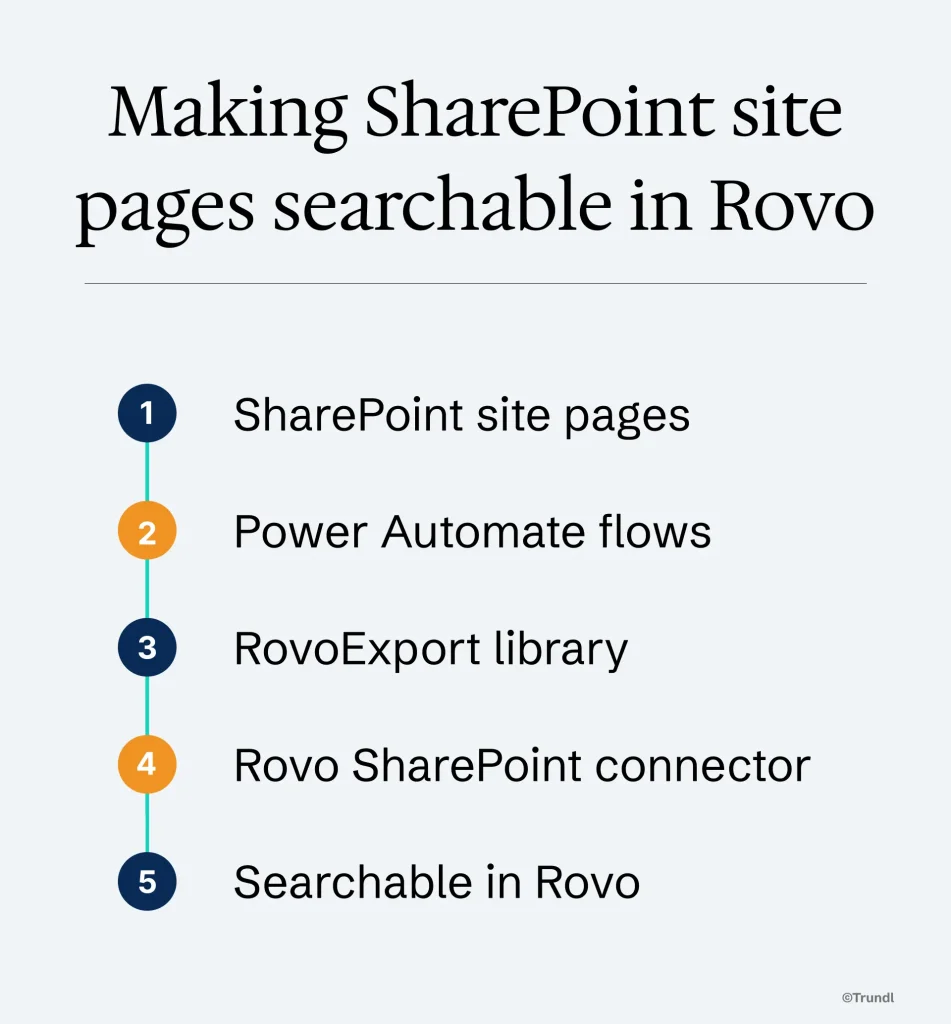
That’s the key idea. We’re not replacing Atlassian’s connector. We’re feeding it content in a format it already understands.
Also worth noting: we’re not exporting pages as visual snapshots for human reading. We’re exporting the text content that matters for indexing. Images aren’t the point here. Searchability is. By focusing on text, the exports stay lightweight, the process stays fast, and we avoid introducing unnecessary tooling or cost.
How it works in practice
The solution uses five flows per SharePoint site.
| Flow | Purpose | Timing |
|---|---|---|
| Export Page On Change | Creates or refreshes the indexed PDF when a page is created or updated | Triggers automatically and usually completes within seconds |
| Remove PDF On Delete | Deletes the matching PDF when a SharePoint page is deleted | Triggers automatically and can complete in about 2 seconds in lab testing |
| Scheduled Export | Weekly maintenance pass that reprocesses every page in the site | Runs off-hours on a schedule |
| Cleanup Orphaned PDFs | Weekly cleanup pass to remove any PDFs that no longer have a source page | Runs off-hours on a schedule |
| Daily Report | Summarizes flow activity, success states, failures, and log handling | Runs daily for monitoring and housekeeping |
Each site gets its own independently configured flow set. That means an HR site, marketing site, sales site, or intranet section can all be handled separately, which makes the design easier to manage and easier to scale.
What about latency?
This is where the behavior matters.
Live page activity is the primary mechanism, not the scheduled job.
When someone creates or updates a SharePoint page, the Export Page On Change flow triggers within seconds and typically completes within seconds. In Tom’s lab testing, one recent example completed in about 20 seconds. When a page is deleted, the Remove PDF On Delete flow also triggers within seconds, and lab tests showed deletions completing in about 2 seconds.
The scheduled export is not the thing keeping content fresh day to day. It’s maintenance. Once a week, it walks the site page by page, deletes each generated PDF, recreates it, and moves on to the next one. That job exists as a reconciliation pass in case something ever falls through the cracks.
The orphaned PDF cleanup works the same way. It’s another maintenance sweep, designed to catch edge cases and remove stale indexed files if a source page no longer exists.
So the short version is simple: live creates, edits, and deletions happen quickly; the weekly scheduled jobs are there as a safety net.
What about performance at larger scale?
In lab testing on the largest sample site Tom built, a weekly scheduled export covering 7 pages completed in under 5 minutes. That’s the longest-running part of the solution, and even then, it’s running off-hours as maintenance.
We deliberately removed artificial page-count limiters during development. A careful way to say it is this: the flows are configured to process the full contents of the configured libraries and are not restricted to the default SharePoint connector page size limits.
For scale across the environment, the solution is designed around independent site-level flow sets. Each site gets its own export and maintenance workflows, which lets the pattern scale across a large SharePoint estate while keeping each site logically separate.
What about cost?
This is another reason we like the design.
The solution primarily uses services many Microsoft 365 customers already have: SharePoint Online, Power Automate standard connectors, and Outlook for reporting. In most environments, the main requirement is a dedicated service account with an appropriate Microsoft 365 license such as Business Premium, E3, or E5.
There’s no need for third-party Power Automate tooling, and storage for generated PDFs is typically measured in gigabytes, not terabytes. Since we’re exporting lightweight text-focused PDFs instead of heavy visual renditions, storage stays manageable.
In other words, this isn’t one of those solutions that sounds clever until procurement gets involved.
What about monitoring?
The last piece is visibility. The export and cleanup flows write their results to CSV in a central SharePoint repository, and a daily reporting job turns the last 24 hours of activity into an admin email.
That report shows what ran, when it ran, whether it succeeded or failed, and which PDFs were created or deleted. If a job fails, it gets called out. If everything succeeds, admins still get a clear record of what happened.
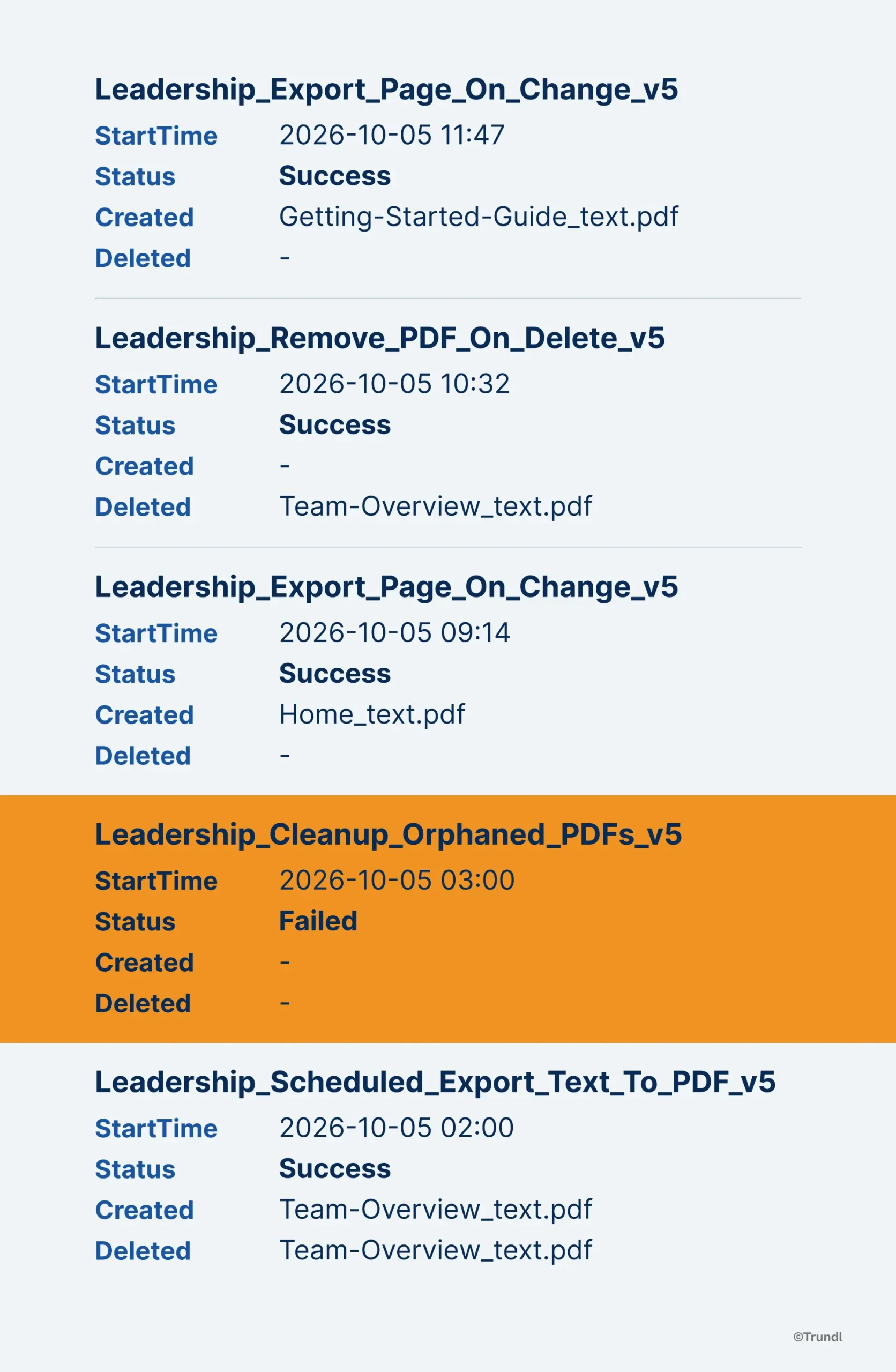
That may not sound exciting, but it matters. The goal is not just to make SharePoint site pages searchable once. It is to give admins a simple way to keep track of the system over time, without digging through individual flow runs unless something needs attention.
What about governance and security?
This part mattered from the beginning.
The customer completed a formal security review, and the implementation was designed to fit inside normal enterprise controls rather than work around them. Exported PDFs inherit the same permissions as their source pages, and the solution uses a dedicated service account model so access can be managed intentionally.
Just as important, content hygiene is built in. When a source page is deleted, the matching PDF is removed automatically. If anything gets missed, the weekly cleanup sweep catches it. That reduces the risk of Rovo surfacing outdated content that the organization no longer wants available in search.
Did we evaluate a bunch of other approaches?
Not really, and that’s not a bad thing.
The direction was to use Power Automate because it was already available, already understood, and already sitting inside the customer’s Microsoft stack. It let us solve the problem with tools the organization had on hand instead of introducing extra platforms, custom app overhead, or unnecessary licensing complexity.
Sometimes the best architecture decision is the one that gets the job done cleanly with the fewest moving parts.
How should we think about this relative to Atlassian?
As a complement, not a competition.
Atlassian already built the connector we’re relying on. It does useful work today. What we built is a practical bridge for a current limitation: SharePoint site pages are not indexed by default in a way that solves this use case.
So we made the content readable to Rovo using the connector that already exists.
If Atlassian eventually adds native support for indexing SharePoint site pages directly, great. At that point, customers may not need this workaround anymore. Until then, this fills a real gap for organizations that have meaningful knowledge sitting in SharePoint pages right now.
And based on what we know today, that gap is not likely to disappear anytime soon.
Why a multi-platform partner matters here
This project lived in the space between Atlassian and Microsoft. That’s where the problem was, so that’s where the solution had to be. Rovo was working with the things it could see. But SharePoint was holding the knowledge it couldn’t see. The missing piece was the bridge between the two.
That’s where working across both platforms matters. If you only look at the Atlassian side, you wait for the connector roadmap to show the needed improvements. If you only look at the Microsoft side, you may never notice the Rovo gap. But when you understand both, the answer looks more practical: use Microsoft Power Automate to turn the SharePoint page content into something Rovo already knows how to index.
That is the kind of seam customers run into all the time. They are not running one platform in a vacuum. They are running Atlassian and Microsoft side by side, and blockers can appear where those systems meet.
A multi-platform partner is useful because they can see that whole picture. Not just what one product does on paper, but what happens in the customer’s environment, and how to close the gap without adding more complexity than the problem deserves.
The interesting part about this project
The interesting part of this project isn’t just that we got around a product limitation. It’s that the limitation was sitting in front of a very common enterprise reality.
A lot of companies have real knowledge in SharePoint site pages. Not just files. Not just attachments. Actual business context.
If that content isn’t searchable, AI answers are incomplete. If AI answers are incomplete, adoption gets harder. And if adoption gets harder, the conversation stops being about AI value and starts being about why the system missed something people know is there.
This solved that problem in a practical way.
This wasn’t about building something flashy
It was about making Atlassian Rovo more useful with the environment customers already have.
Live page changes trigger updates within seconds. Deletions clean up within seconds. Weekly maintenance jobs reconcile anything that might have slipped through. The whole thing runs on standard Microsoft 365 components, keeps storage reasonable, and gives organizations a way to make SharePoint site knowledge searchable now instead of waiting on a future roadmap item.
That’s usually the kind of solution customers appreciate most. It solves the problem in front of them, works with the tools they already own, and doesn’t make things more complicated than they need to be.
Running Atlassian and Microsoft side by side and hitting a gap like this one? That’s exactly the kind of seam Trundl works in every day. Reach out and we will walk through what’s possible for your environment.